Crosslisty Add to Chrome

Features

Everything Crosslisty does for your listings

One listing in, a filled form on every marketplace out. Then Crosslisty watches for the sale and helps take the other copies down.

Crosslisting

Fill every marketplace form from one listing

Import a listing you already have, then send it. Each marketplace’s own form opens and fills itself in.

  • eBay
  • Poshmark
  • Mercari
  • Depop
  • Etsy
  • Vinted
  • Facebook
  • Grailed
  • Photos come along, full size, up to each marketplace’s limit.
  • Fits each marketplace. Titles trimmed to each limit, emoji removed where they’re not allowed, brand, size and condition added.
  • Dropdowns picked for category, condition, brand and size, with a reason when one is left for you.
  • Price per marketplace, raised or lowered by a percentage to cover each one’s fees.
  • A checklist on every form shows what was filled and what to check, with a jump button to each field.
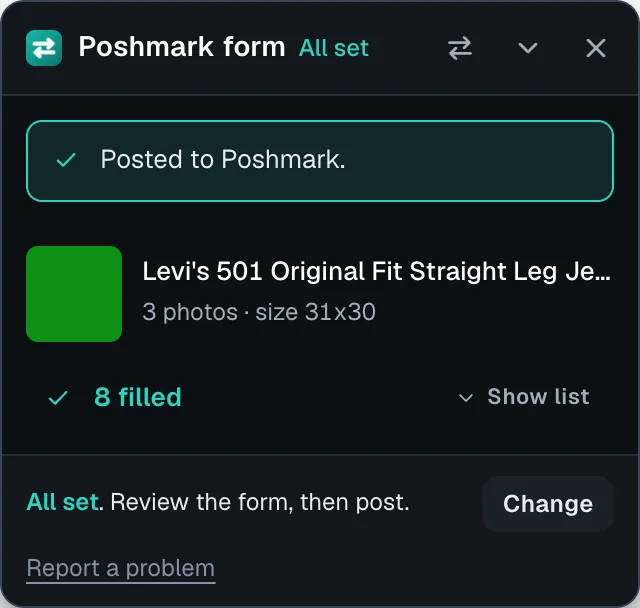
Crosslisty on a Poshmark form: all set, 8 fields filled and posted
Every field filled, posted to Poshmark.
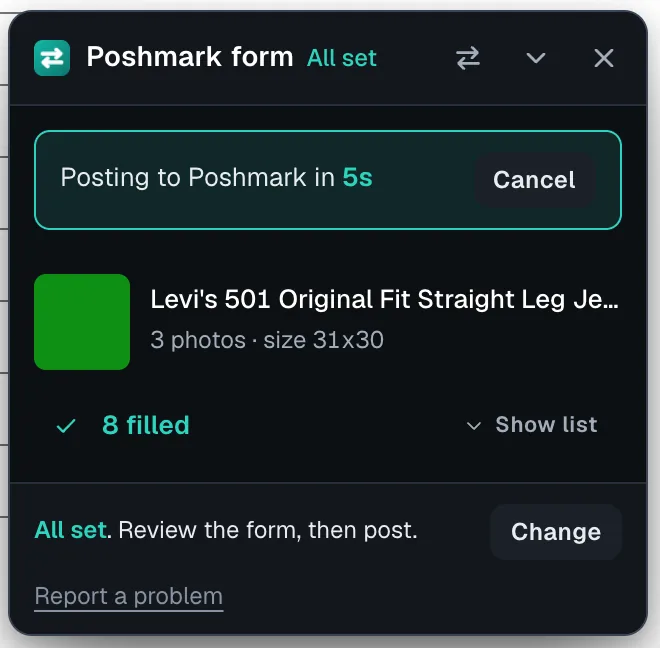
Crosslisty auto post countdown on a complete Poshmark form, with a Cancel button
Auto post, with 5 seconds to cancel.

Sold sync

Sold on one, taken down on the others

Selling the same item twice is the risk of crosslisting. Crosslisty checks your marketplaces for sales while your browser is open and helps remove the other copies.

  1. It checks for sales

    Every 15 minutes on most marketplaces, every 30 on Vinted, while your browser is open. You can also press Check sales.

  2. You confirm

    Crosslisty asks before it removes anything, unless you turn on automatic removal in Settings.

  3. Copies come down

    Removed for you on Poshmark, Mercari, Depop, Vinted and Grailed, and checked afterwards. On eBay, Etsy and Facebook it opens the listing so you end it in one click.

Relist in one step

Bring a stale listing back as new on Poshmark, Mercari, Depop, Vinted and Grailed. Crosslisty saves its own copy of the photos first and takes nothing down if it can’t.

Email when something sells

Optional. Leave your email and Crosslisty sends a short note with the item’s title when a sale is found, so you can act fast.

Free plan: sale checks and removal on your 10 newest crosslisted items. Pro: every item.

Sell faster

Bulk tools, orders, offers and Poshmark sharing

Pro tools for sellers with more than a handful of items. Each one shows you what it will do before it does it.

Bulk delist and relist

Delist up to 100 items a run and relist up to 25, with counts first and a result for every item. The fresh listing is posted before the old one comes down.

Orders page

Sales from Poshmark, Mercari, Depop, Vinted and Grailed in one table, with the fee each marketplace reports, shipping status and tracking.

Offers to likers

Preview every offer on Mercari and Depop with what you would keep, then send. Offers below your floor are skipped and never repeat for 30 days.

Poshmark closet tools

Share your closet once or on a schedule, offer likers a discount, follow and share back, with daily caps and active hours. It stops at every security check.

Bulk edits, duplicate merge and automatic import are in the inventory too. Free plan: one bulk run of up to 10 items and your last 30 days of orders.

AI writing, optional

Listings written from your photos

Connect your own Google Gemini key and Crosslisty writes like a reseller. Off until you connect it.

  • Writes the listing from your photos: summary, material, measurements, condition and flaws.
  • Tailors each marketplace, rewriting the title and description in its style, and in the local language on Vinted’s European sites.
  • Picks the right dropdown when a category or size has no exact match.
  • Cleans up the cover, adding a white background copy as photo 2.

Your key, your data

The key stays in your browser and your photos are only sent to Google. Gemini has a free tier. Crosslisty never sees your key.

Photos

A photo editor built for listings

Fix a photo before it goes out, without another app.

Crop and rotate

Free or preset crops, rotate and flip. Square photos for Poshmark, Mercari and Depop if you want them.

Light and color

Brightness, contrast, saturation and auto enhance. Hold to compare with the original.

Order and cover

Drag to reorder, or use Alt and the arrow keys. Choose the cover photo.

Low resolution warning

Photos under 800 pixels get a badge, so you know which ones a marketplace may show blurry.

iPhone photos explained

HEIC photos from an iPhone get a clear message instead of failing quietly.

Inventory

Every listing on one page

The dashboard shows each item, where it’s listed and whether it sold. It works for items you haven’t listed anywhere yet, too.
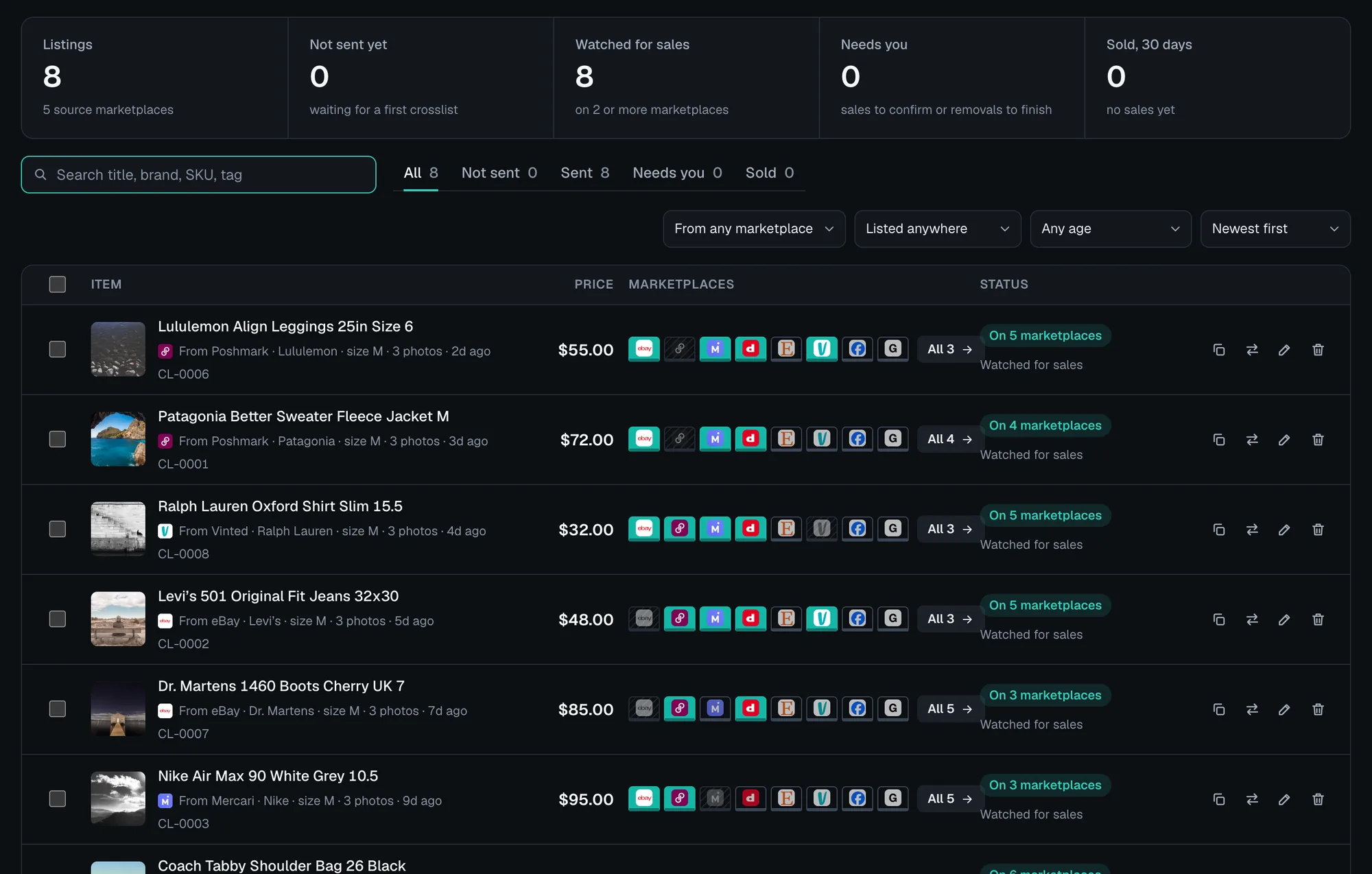
Crosslisty dashboard with ten listings, the marketplaces each is on and its sale status
The dashboard, with sample listings.
  • Search, filter and sort by status, source marketplace, price or age.
  • Send many at once. Select listings and send them to any marketplace in one go.
  • Hand-added items with photos, SKUs like CL-0001, storage spots, tags and quantity.
  • Bulk edit and price drops across many items at once.
  • CSV import and export, plus backup and restore, so your inventory is never stuck in one browser.
  • Keyboard first. Press / to search, Enter to send, 1 to 7 for one marketplace.

Profit and insights

Know what sells and what you keep

Insights reads your own listings and sales, in your browser.
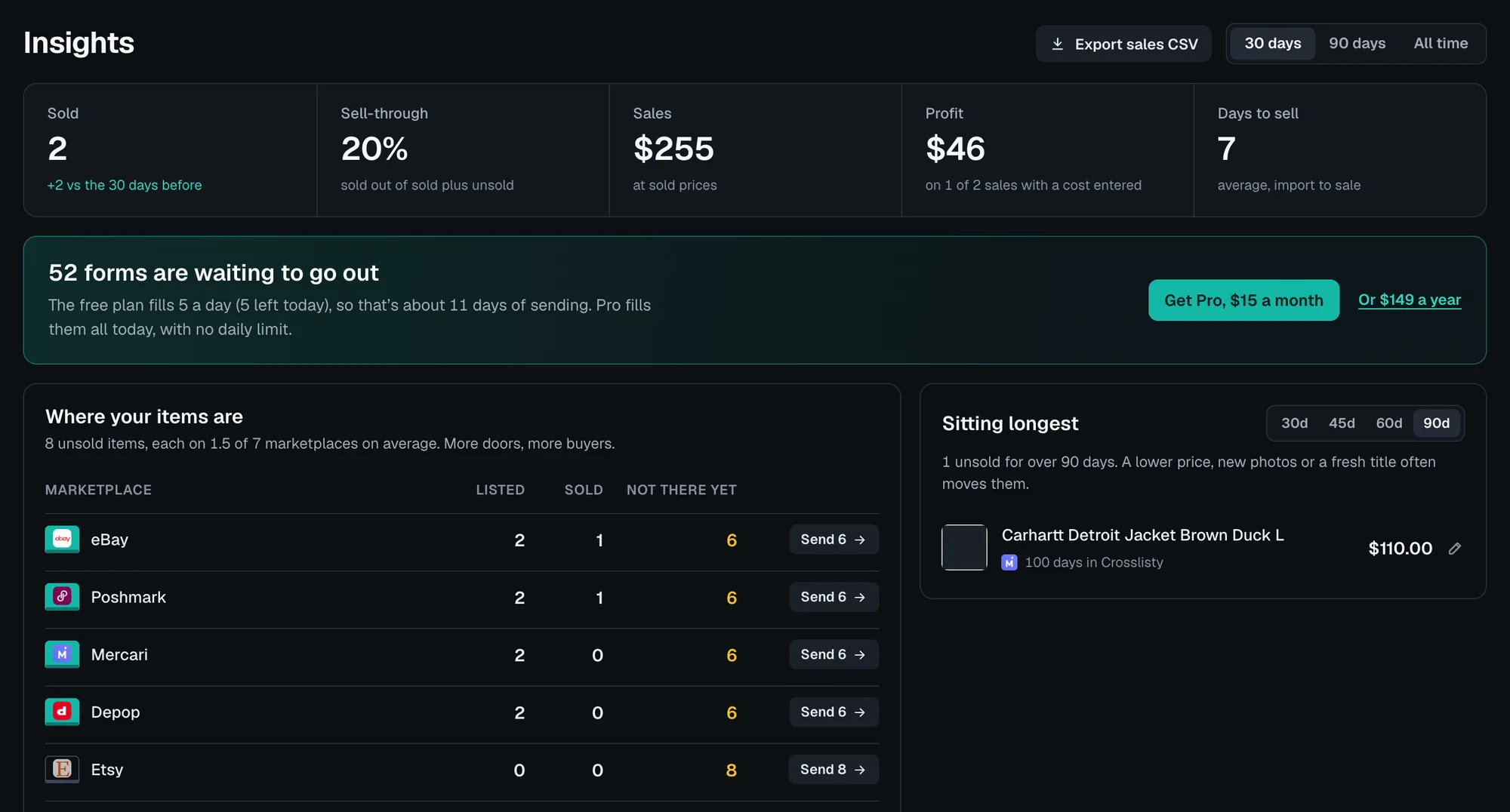
  • Sold, sell-through and sales for the last 30 days, 90 days or all time.
  • Profit on every sale where you entered what you paid.
  • Days to sell on average, from import to sale.
  • Where your items are, marketplace by marketplace, with how many items aren’t on each one yet.
  • Sitting longest, the items unsold for 30 to 90 days, to reprice or refresh.
  • Expenses and a tax summary with mileage, exported as CSV. An estimate for your records, not tax advice.
Crosslisty Insights: sold, sell-through, sales, profit and days to sell, with a table of where items are listed
Insights, with sample data.

Privacy and control

Your accounts, your browser, your call

What Crosslisty does

  • Uses the accounts you’re signed in to. No passwords, ever.
  • Keeps listings in your browser, never on our servers.
  • Posts only when you say so. You press post, or turn on auto post per marketplace for complete forms. Vinted stays manual.
  • Shows each marketplace’s account problems with a link that fixes them, like a missing address or verification.

What it won’t do

  • Solve security checks. If a marketplace asks for one, Crosslisty stops and you pass it yourself.
  • Run with the browser closed. Everything happens in your browser, so sale checks pause when it’s closed.
  • Ignore a marketplace that says slow down. It waits the time the marketplace asks for.

Try it on your next listing

5 free fills every day. Pro is $15 a month for unlimited fills.

Add to Chrome, it’s free

List once. Sell on all eight.

  1. Import in one clickPull in any listing of yours, photos included.
  2. Improve it with AIOptional, on your own Gemini key.
  3. Every form filledTitle, price, brand, size, category and condition.
  4. You check and postNothing posts unless you turn on auto-post.
  5. Sold items come downIt spots the sale and clears your other listings.
  6. Relist in one stepYour photos are saved and a fresh form opens.
Add to Chrome, it’s free

5 free fills every day, no card. Runs in your browser with your own sign-ins. Pro is $15 a month for unlimited fills.